
Free Google Review Link Generator & QR Code
Make it easy for happy customers to review you. This free Google review link generator turns your Place ID, Google Maps link or Business Profile link into a direct review link, a scannable QR code and a printable review card. No sign-up, no API key, and nothing you type leaves your browser. Built for contractors and local service businesses.
2 Your Google review link
Tip: test it on your phone. Customers need to be signed in to a Google account to post a review.
3 QR code
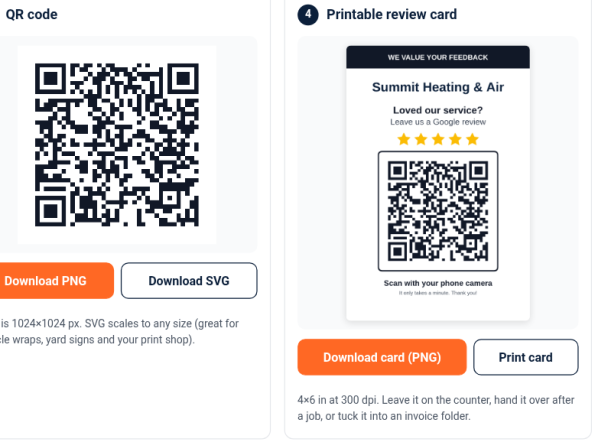
PNG is 1024×1024 px. SVG scales to any size (great for vehicle wraps, yard signs and your print shop).
4 Printable review card
4×6 in at 300 dpi. Leave it on the counter, hand it over after a job, or tuck it into an invoice folder.
How to use this Google review link generator
- Paste what you have. The best option is the review link Google gives you inside your Business Profile (it looks like
g.page/r/…/review). You can also paste your Place ID, or a Google Maps link to your business. - Add your business name and pick a color. The name appears on your printable review card. Dark colors scan best.
- Copy, test and download. Copy your link, tap Test link to make sure it opens your business, then download your QR code (PNG or SVG) and your 4×6 review card.
Why a direct link matters: a review link built from your Place ID (https://search.google.com/local/writereview?placeid=…) opens the Google review form for your business. Customers skip the searching and scrolling, and that direct link is exactly what this Google review link generator builds for you.
How to find your Google review link (3 ways)
Your Google review link opens the “write a review” box for your business. There are three ways to get one, and the Google review link generator above accepts all three.
1. From your Google Business Profile (best)
Sign in to the account that manages your profile and search your business name on Google. Choose Read reviews, then Get more reviews (some profiles show Ask for reviews), and copy the short link. It looks like https://g.page/r/…/review. Google explains how to create a link or QR code to request reviews.
2. From your Place ID
Every Google listing has a Place ID, a unique code that usually starts with ChIJ. Look up your business in Googles free Place ID Finder, then paste the ID into the Google review link generator.
3. From a Google Maps link
Open your business in Google Maps, tap Share and copy the link. If it has no Place ID, the tool opens your listing instead, and customers tap Reviews, then Write a review. Use method 1 or 2 when you can.
Free QR code generator for Google reviews: PNG, SVG and a printable 4×6 card
Once your link is ready, the tool doubles as a free QR code generator for Google reviews. You get three files:
- PNG (1024 × 1024 px): for invoices, estimates and email signatures.
- SVG: stays sharp at any size for truck wraps and yard signs.
- Printable 4×6 review card (300 dpi): your business name, a “Leave us a Google review” message and the QR code.
Pick a brand color, but keep it dark on white so it scans reliably. Your Google review QR code points straight to Google, not to a redirect service.
Where to use your Google review QR code and card
The QR code from the Google review link generator above works anywhere a customer might have their phone in hand. Ideas that suit service businesses:
- Leave-behind card: print the 46 card and leave it on the counter or with the invoice after every job.
- Invoices and estimates: add the QR code to your invoice template and estimate PDFs.
- Service trucks and vans: use the SVG file so your sign shop can print it large and sharp.
- Yard signs and door hangers: use a small QR code under Happy with our work? Review us on Google.”
- Email signature and follow-up emails: paste the link as text, or add the PNG as a small image.
Tip: always scan a printed test copy with two different phones before you order a big print run.
How contractors can get more Google reviews (without being pushy)
For HVAC techs, roofers, plumbers and electricians, most new customers compare a few local companies before they call. Reviews are often what tips the decision. Getting more is mostly about asking consistently and making it effortless.
Ask at the right moment
The best time to ask is right after the job is finished and the customer can see the result. A simple line works: “If you were happy with the work today, a Google review really helps a small business like ours.” Then hand over the review card or send the link.
Send the link the same day
People mean to leave a review, then forget. Text or email your Google review link within a few hours of the job, while the visit is still fresh.
Ask every customer, not just the happy ones
Google’s policy does not allow businesses to selectively solicit positive reviews. Ask everyone the same way.
Make it part of the routine
Generate your link once with the Google review link generator, then reuse it everywhere: your job-completion checklist, review card, follow-up email or text template.
Reply to your reviews
Thank people by name and mention something specific about the job. For a negative review, stay calm, acknowledge the issue and offer to sort it out offline. See Google’s tips to get more reviews.
Copy-and-paste review request text for HVAC, roofing, plumbing and electrical jobs
Paste the link from the Google review link generator into one of these short texts and send it the same day.
HVAC
Hi Maria, thanks for choosing Summit Heating & Air today. If you have a minute, we’d really appreciate a Google review: [your link]. Thank you! – Jake
Roofing
Hi Linda, thanks for trusting Ridgeline Roofing with your new roof. Would you share your experience in a quick Google review? [your link]
Plumbing
Hi Chris, it’s Ana from Flowright Plumbing. Thanks for calling us this morning. If you’re up for it, we’d love your honest feedback on Google: [your link]
Electrical
Hi Sam, thanks for choosing Brightline Electric. A short Google review about your panel upgrade would mean a lot: [your link]
Ground rules: send the same text to every customer, don’t mention stars, discounts or what to write, and stop if someone replies STOP.
What not to do: Google’s review rules
Reviews have to reflect a genuine experience. According to Google’s Maps user-generated content policy, businesses should not:
- Offer incentives. No discounts, free service, gift cards or payment in exchange for a review.
- Gate reviews. Don’t screen customers first or only ask customers you expect to be positive.
- Discourage negative reviews or pressure customers to leave a review.
- Ask for specific content or post fake or conflicted reviews.
What is allowed: asking all your customers for honest feedback, with no strings attached. That is exactly what this Google review link generator and QR card are for.
More reviews bring more visitors. Is your website ready?
When someone reads your reviews, the next thing they usually do is tap through to your website. If the site is slow, outdated or hard to use on a phone, some leads will leave before they call. Check your website with our free contractor website grader.
At Saaj Web Design we build fast, mobile-friendly websites for U.S. contractors and local businesses. Browse our contractor website examples, then request your free homepage preview or chat with us on WhatsApp.
Is this Google review link generator really free?
Yes. There is no sign-up, no API key and no limit. The tool runs in your browser, so the details you paste are not sent to our server.
How do I get my Google review link?
While signed in to the account that manages your Business Profile, search your business name on Google, choose Read reviews, then Get more reviews, and copy the link. Or paste your Place ID or a Maps link into the Google review link generator above.
What is a Google Place ID and how do I find mine?
A Place ID is a unique code Google uses for each business listing. Most business Place IDs start with ChIJ. The easiest way to find yours is Google’s free Place ID Finder: search your business name and copy the ID shown on the map.
Can I get a Google review link without access to the Business Profile?
Yes. Find your business in Google’s free Place ID Finder, copy the Place ID and paste it into the Google review link generator above. It builds a direct review link, no owner access needed.
Will the QR code ever expire?
No. The QR code from this Google review link generator points straight to your Google link, not to a redirect service, so it keeps working as long as your Google link does. If your business moves or your listing changes, generate a new code and test it.
Why does my Google Maps link only open my listing instead of the review form?
Many Google Maps links do not contain a Place ID. In that case the Google review link generator creates a link that opens your Google listing, where customers tap Reviews and then Write a review. For a one-tap review link, copy the review link from your Business Profile or use the Place ID Finder.
Why is my Google review link not working?
Test it in a private browser window, since the profile’s own account doesn’t always see the review form. If it still fails, the profile may have changed, merged or been suspended, so create a fresh link and test again.
Do customers need a Google account to leave a review?
Yes. Google requires reviewers to be signed in to a Google account. They can create one with any email address, not just Gmail.
Can I offer a discount for leaving a review?
No. Google does not allow incentives such as discounts, free services or payments in exchange for reviews. You can, and should, ask every customer for honest feedback.