
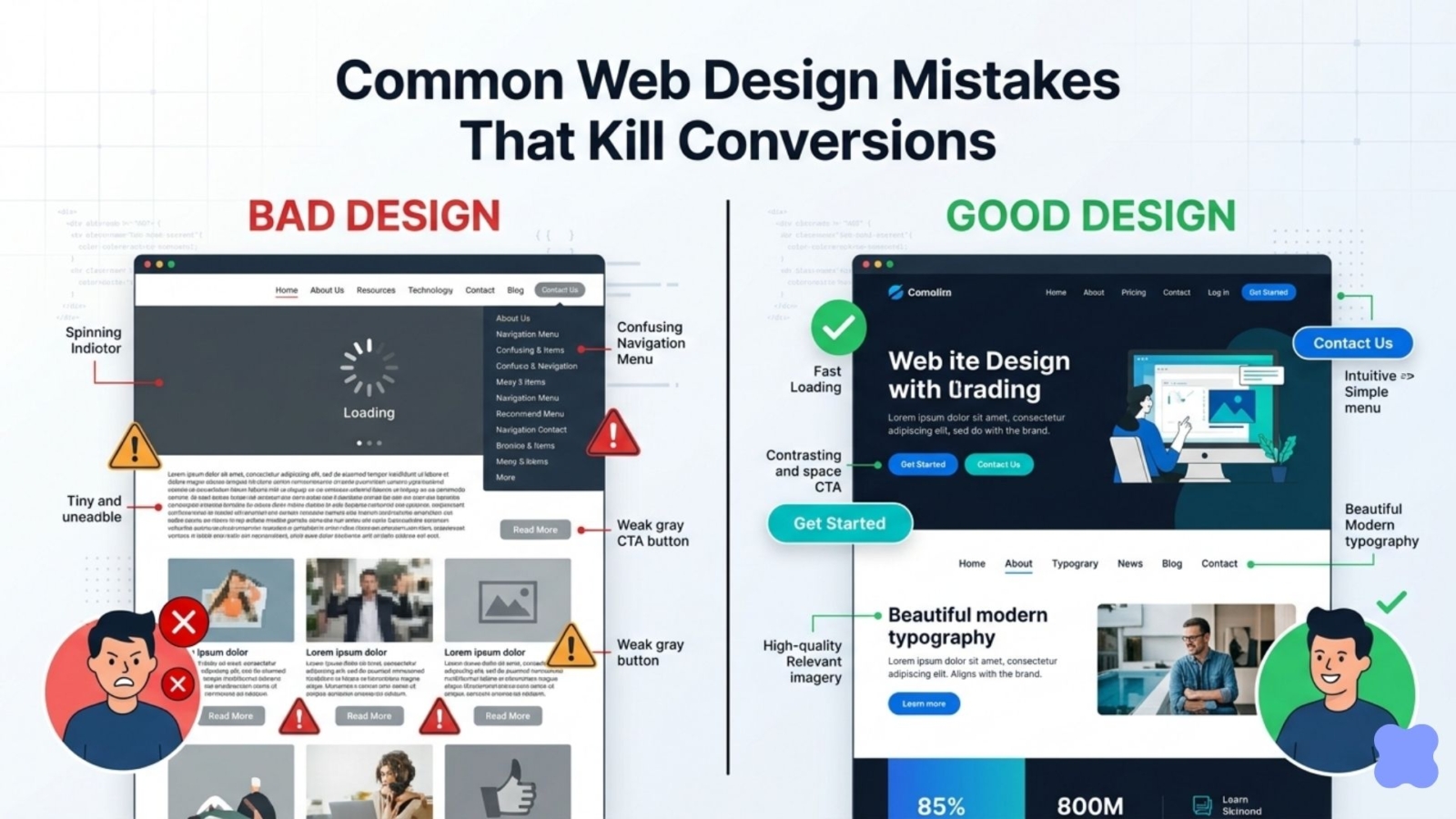
Common Web Design Mistakes That Kill Conversions
(And How to Fix Them in 2026)
In today’s competitive online world, your website often serves as the first and only opportunity to turn visitors into paying customers. Yet many businesses unknowingly damage their own success through common web design mistakes that kill conversions.
Even a visually appealing website can fail miserably if it creates friction, confusion, or distrust for users. Research shows that poor user experience leads to high bounce rates, with many visitors leaving within just a few seconds. In 2026, where attention spans are shorter and mobile traffic continues to dominate, these common web design mistakes that kill conversions can cost businesses significant revenue every month.
This comprehensive guide uncovers the top web design mistakes that kill conversions and provides practical, actionable solutions. Whether you’re a small business owner, startup founder, or freelancer, avoiding these errors can dramatically boost your website’s performance.
1. Slow Loading Speed – One of the Deadliest Common Web Design Mistakes That Kill Conversions
One of the most damaging common web design mistakes that kill conversions is poor page loading speed. Modern users expect a website to load in under 2–3 seconds. Every additional second of delay can reduce conversions by as much as 20%.
Why it hurts conversions: Frustrated visitors simply leave. Slow websites also perform worse in Google rankings because of Core Web Vitals.
Common causes:
- Unoptimized large images
- Excessive JavaScript and plugins
- Inefficient code or poor hosting
How to fix it:
- Compress and properly format all images
- Enable caching and use a reliable CDN
- Minify CSS, JavaScript, and HTML files
- Choose fast hosting optimized for performance
Test your current speed with Google’s free Page Speed Insights tool.
As a freelance web designer, I make speed optimization a core part of every project. My Professional and Premium packages include full performance tuning so your site loads quickly and avoids being one of the common web design mistakes that kill conversions.
2. Poor Mobile Experience (Non-Responsive Design)
Ignoring mobile users is another frequent web design mistake that kills conversions. With more than half of all internet traffic coming from mobile devices, a non-responsive design frustrates visitors and leads to lost sales.
How to fix it:
- Design with a true mobile-first approach
- Use flexible, responsive layouts that adapt perfectly to any screen size
- Test thoroughly on real mobile devices
- Ensure all buttons and links are easy to tap
Responsive design is non-negotiable in 2026. I always build sites that deliver an excellent experience across devices, helping you steer clear of common web design mistakes that kill conversions.
3. Confusing or Overcomplicated Navigation
If visitors cannot find what they need quickly, they will leave. Confusing navigation remains one of the most common website design mistakes that reduce conversions.
Signs of the problem:
- Too many menu items
- Vague or unclear labels
- Important pages buried in complex dropdowns
How to fix it:
- Limit the main menu to 5–7 clear items
- Use descriptive, user-friendly labels
- Add a prominent search bar when needed
- Include breadcrumb navigation on inner pages
Simple and intuitive navigation smoothly guides users toward your conversion goals.
4. Weak or Missing Calls-to-Action (CTAs)
Unclear or poorly designed CTAs are among the top common web design mistakes that kill conversions. Visitors arrive on your site but don’t know what action to take next.
How to fix weak CTAs:
- Use high-contrast colors so buttons stand out
- Write benefit-driven, action-oriented text (e.g., “Get Your Free Quote” instead of “Submit”)
- Place the main CTA above the fold and repeat it naturally
- Avoid having too many competing buttons on one page
Strong, clear CTAs remove guesswork and gently encourage users to convert.
5. Cluttered Layouts and Poor Visual Hierarchy
Cluttered designs overwhelm visitors and make it difficult to focus on your message. This is a classic web design mistake that kills conversions by creating visual noise.
How to fix it:
- Use generous white space to let content breathe
- Create clear visual hierarchy with size, color, and spacing
- Stick to 2–3 fonts maximum
- Remove any elements that don’t support your main goal
Clean, focused layouts help users scan quickly and take action more easily.
6. Lack of Trust Signals
In 2026, users are more cautious than ever. Websites missing trust elements trigger doubt and become one of the silent common web design mistakes that kill conversions.
How to build trust:
- Display real customer testimonials with photos
- Add security badges near forms and checkout areas
- Include clear contact information and privacy policy
- Use authentic images instead of generic stock photos
Trust signals turn skeptical visitors into confident customers.
7. Weak or Unclear Value Proposition
If visitors don’t quickly understand what you offer and why it matters, they bounce. A vague headline or buried benefits counts as a serious conversion-killing web design mistake.
Solution:
- Craft a compelling headline and sub-headline above the fold
- Focus on benefits rather than just features
- Speak directly to your audience’s pain points
- Support claims with visuals or short proof points
A strong value proposition keeps visitors engaged and moving toward conversion.
Additional Mistakes to Avoid
- Poor readability (low contrast, tiny fonts, long text blocks)
- Broken links or outdated content
- Ignoring web accessibility standards— follow the Web Content Accessibility Guidelines (WCAG) to make your site usable for everyone.
How a Professional Website Redesign Helps You Avoid These Mistakes
Addressing common web design mistakes that kill conversions often delivers one of the fastest returns on investment for your business. A strategic redesign can significantly increase leads and sales.
I specialize in creating fast, clean, and conversion-focused websites for clients worldwide. My clear packages are designed for real results:
- Starter ($100): Clean responsive design with essential optimization
- Professional ($200): Mobile-first build, speed optimization, strong CTAs, and trust elements
- Premium ($500): Advanced UX/UI, custom features, thorough testing, and support
Many clients report noticeable improvements in engagement and inquiries after moving to a professionally designed site that avoids these common pitfalls.
Take Action: Fix Your Website Today
Don’t let common web design mistakes that kill conversions continue costing you potential customers. Review your current website against the points above, or let an experienced freelancer handle the improvements for you.
Ready for a modern, high-converting website that actually works for your business in 2026? Check my website packages or contact us today to get started.
A smart investment in better web design can deliver excellent returns for years to come.